

![How NRIs Can Activate UPI on NRO Account [Paytm, Phonepay, Googlepay] Guide 2026](https://locatehubs.com/wp-content/uploads/2026/08/ChatGPT-Image-Aug-18-2026-10_14_32-PM.png "How NRIs Can Activate UPI on NRO Account [Paytm, Phonepay, Googlepay] Guide 2026")
How NRIs Can Activate UPI on NRO Account — Let’s understand this with an example. Suppose you moved to London, and along with that, your Indian SIM card was also deactivated. But your parents’ grocery store in Pune only accepts UPI payments. Now, what do you do in that situation?
The simple answer is: If your status changes to NRI, then:
- Convert your resident savings account to an NRO account.
- Second, link your NRO account to UPI.
If that sounds familiar, you’re not stuck — you need the NRO-specific steps that most guides skip.
This article walks you through activating UPI on NRO account with Google Pay, PhonePe, and Paytm, plus the tax, limit, and error details that are specific to NRO — not copy-pasted from NRE guides.
Key Takeaways
- No Indian SIM card is required to activate UPI on NRO account.
- You need an international number from one of the 12 NPCI-approved countries to use UPI.
- Your number must be linked to your NRO account specifically at the bank level before any UPI app will work.
- GPay, PhonePe, and Paytm each have different onboarding processes for NRO accounts.
- UPI transactions don’t affect your $1 million/year repatriation limit — it is separate from NRO’s TDS and remittance rules.
- Some banks may apply lower daily UPI limits on NRO accounts than the standard ₹1 lakh — always confirm your applicable limit with your bank.
Why NRO Accounts Matter for NRI UPI Transactions
- Easy UPI Payments: NRIs can link UPI to their supported international mobile number and their NRO for easy UPI payments in India.
- NRIs can easily manage Local Expenses: rental income, dividends, pension and other eligible Indian income can be credited to an NRO account and used for allowed payments.
- NPCI & Bank Compliance: If you want to use UPI with an international mobile number, this facility is available only through banks and UPI apps that support the applicable rules/framework of NPCI.
- Direct INR Payments: NRO funds can be used for local INR payments without converting foreign currency for every transaction in India.
- Convenient Access: If you’re an NRI from a supported country, you don’t need an Indian SIM to use UPI. You can use UPI with your foreign mobile number if your bank and UPI app support this feature.
Who Is Eligible to Activate UPI on NRO Account?
The most important is if you are an NRI, it doesn’t mean that you can activate UPI automatically. To use UPI on an NRO account, you generally need an active NRO account with a participating Indian bank, an international mobile number from one of the 12 supported countries, and the number must be registered with your NRO account.
You may Eligible if:
- Active NRO account with a participating bank
- International number from a supported country
- Number linked to your NRO account
- Updated KYC details
- Supported UPI app and bank
You May Not Be Eligible If:
- Your bank or UPI app does not support international numbers
- Your country is not on the supported list
- Your number is not linked to your NRO account
- Your account is dormant, blocked, or restricted
Good to know: You don’t need an Indian SIM if your international number and bank meet the applicable requirements.
Before You Start: Link Your Number to the NRO Account
It is not done on the UPI application. This process will be done via your bank. Your international number must be registered for your NRO account prior to initiating the UPI registration.
- You can verify your international number registered for your NRO account using netbanking, the bank application, or by contacting your bank or relationship manager.
- Your international number must belong to one of the 12 supported countries: US, UK, UAE, Canada, Singapore, Australia, Hong Kong, Saudi Arabia, Oman, Qatar, France, or Malaysia.
- After registering your international number with the NRO account, you can continue with the UPI registration.
How Can NRIs Activate UPI on an NRO Account?
Yes, NRIs can activate UPI on an eligible NRO account, subject to their bank and UPI app supporting international mobile numbers. There are three popular UPI apps that NRIs commonly look at — Google Pay (GPay), PhonePe, and Paytm.
In the sections below, we explain the step-by-step process for each app, so you can understand how to activate and use UPI with your NRO account.
Activating UPI on Google Pay for an NRO Account
Step 1: Download and set up Google Pay from the Play Store
Complete the initial setup using the mobile number linked to your bank account. Complete the verification process using the OTP you receive.
Download Google Pay from the Google Play Store.
Step 2: Add Your NRO Bank Account
Open your Google Pay profile,
- Select Pay Methods → Add Bank Account, and choose the bank where you hold your NRO account.
- Select your NRO account from the available accounts.
Step 3: After selecting Set Your UPI PIN
Now, after completing the second step, just set your UPI PIN. You need the following steps to set your UPI PIN:
Last six digits and expiry date of your Debit Card.
OTP verification (Sent to your Registered Mobile Number linked with your NRO account), and then set your UPI PIN.
Step 4: Start Using UPI
Once your NRO account is successfully linked and your UPI PIN is set, you can start making UPI payments through Google Pay, subject to your bank and app support.
Important Notes
First 24 Hours: After setting or resetting your UPI PIN, a lower transaction limit may apply for the first 24 hours.
Daily Limit: UPI transaction limits can vary by bank and app. Check your bank’s applicable limit before making large payments. Mainly, the UPI limit is ₹1,00,000 (1 Lakh).
International Number: If you use an international mobile number, make sure your SIM can receive the required SMS for verification.
Activating UPI on PhonePe for NRO Account
Step 1: Open the PhonePe App
Download and open the PhonePe app on your smartphone. Enter your International mobile number linked to your NRO account.
Step 2: Verify Your International Number
Now OPT will sent to your mobile number and complete the verification process.
Important: Make sure the number is active and registered with your NRO account so PhonePe can verify your bank details.
Step 3: Select Your NRO Bank Account
Once your number is verified, select the Indian bank where you hold your NRO account.
PhonePe will display the eligible account linked to your registered mobile number. Select your NRO account and follow the on-screen instructions to complete the setup.
Step 4: Set Your UPI PIN and Start Using UPI
Now the last step is to set your UPI PIN if prompted. Once the setup is complete, you can use PhonePe to make eligible UPI payments in India from your NRO account.
Here is a Video that shows how to link your phone pay account to your NRO account.
Activating UPI on Paytm for NRO Account
Step 1:- Open the paytm App
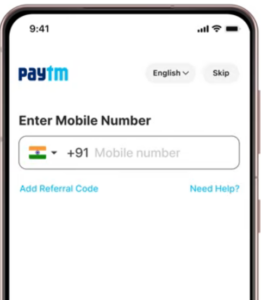
- Enter your international mobile number, click Proceed, and verify your mobile number using the OTP sent to your registered number.
- Add your NRO account to Paytm by selecting your bank. For example, if you have an NRO account with HDFC Bank, select HDFC Bank and follow the on-screen instructions to add your account.
Our Tip: Before adding your bank account, make sure your existing resident savings account has been properly converted to an NRO account after becoming an NRI. Using an account that has not been converted to NRO may cause issues with UPI registration or transactions.
- Once you receive a confirmation message on the screen, you can start making UPI transactions through Paytm.
What About TDS, Repatriation & UPI Limits?
- TDS: Using UPI does not change the TDS applicable to income or interest earned through your NRO account.
- Repatriation: Domestic UPI payments in India do not count toward the USD 1 million NRO repatriation limit, which applies to eligible remittances made outside India.
- UPI Limits: Your UPI transaction limit depends on your bank, UPI app and applicable transaction limits. Always check the limit applicable to your NRO account.
Common Question asked by our customers
Can I activate UPI on my NRO account without an Indian SIM?
Yes. You can easily activate UPI without Indian SIM card. But you have international international number from 12 approved countries, linked directly to their NRO account — no Indian SIM needed.
Does activating UPI affect my NRO account’s tax status?
No. Activating UPI does not change the tax rules for your NRO account. Any applicable TDS on NRO interest or income continues to apply whether you use UPI, netbanking, or other payment methods.
Which bank is easiest for NRO UPI activation?
ICICI Bank and IDFC First Bank currently offer the smoothest self-service linking for NRO accounts with international numbers, without needing a branch visit or RM request.
Can I use GPay, PhonePe, and Paytm together on one NRO account?
Yes, you can register the same NRO account across multiple UPI apps. Each app generates its own UPI ID linked to the same underlying account.
What happens to my old UPI ID if my account got converted to NRO?
It may show as active but fail during transactions. Re-verify your registration through your bank and re-link your international number specifically against the NRO account to fix this.
What if my country isn’t on the NPCI-approved list?
You’ll need to maintain an Indian number for UPI access, since registration currently only works for numbers from the 12 approved countries. Check with your bank periodically, as the list is expanding.
Final Word
Activating UPI on an NRO account isn’t complicated once you know it’s a two-step process: link your international number at the bank level first, then handle the app-specific quirks of GPay, PhonePe, or Paytm. Most failed attempts trace back to skipping that first step or using the wrong app version.
If your bank hasn’t enabled self-service NRO linking yet, a quick call to your relationship manager usually resolves it faster than troubleshooting the app itself. Still stuck after following these steps? Reach out to your bank’s NRI banking desk directly — they can confirm your account-specific limits and clear any registration blocks in one call.
Disclaimer: This article is for general informational purposes only and does not constitute financial, tax, legal, or banking advice. UPI availability, eligibility, transaction limits, and NRO account requirements may vary by bank and can change over time. Please confirm the latest requirements with your bank or authorized financial institution before proceeding.
